
If you’re just getting started with GraphQL in .NET with HotChocolate, you’ll be happy to know how easy it is.
This guide is a work in progress (I’m busy, right!), but I will add to it as and when, and if you have any questions please ask me in the comments.
Firstly, let’s cover why GraphQL is better than WebAPI (REST):
Why is GraphQL better than WebAPI (REST)?
The beauty of GraphQL is the user requests exactly the data they need, and that’s exactly what they have returned to them.
This means the data going over the network doesn’t contain any bloat like you have with WebAPI – for example, you may want to retrieve a list of Product Ids and Names, whereas a WebAPI endpoint will likely give you sale price, retail price, SKU, or other data you simply don’t need for the job at hand.
With GraphQL, you say “I want all Product Ids and Product Names”, and that’s exactly what you get back.
The load on the database is also streamlined (assuming you create your GraphQL correctly), so any filters or selects are applied to the database query before hitting the database – how good is that?
So, compared with WebAPI, GraphQL with HotChocolate reduces over-fetching, under-fetching, and better performance from reducing waste in database queries and returning unnecessary data.
It’s therefore more precise, cleaner, and more predictable than an API with REST.
Getting started with a video tutorial
I won’t beat around the bush – I got started with GraphQL using HotChocolate in .NET using the video tutorial series from SingletonSean.
It’s a great starting point, although as a software architect I will add further advice below on best practices.
For example, in the video tutorial Sean uses Respositories – I would advise against this, and by the end of the tutorial you’ll see Sean experiences the reasons why.
He also mentions Auto Mapper – I wouldn’t use that either. Yes, it’s a shortcut, but in reality your data model (such as Entity Framework) will very likely differ from your GraphQL API – perhaps not so much if you opt for CRUD, but very likely will if you create queries which relate more to business logic or functions such as PurchaseProduct or AddProductToBasket etc.
Anyways, here’s the video – it’s an excellent tutorial!
Fluent Validation in HotChocolate
There’s lots of ways to skin a cat, but if you want clean mutations it’s worth housing validation logic in validators using FluentValidation.
As of writing this guide, FairyBread is my preference – it’s easy to use, with no faff.
FluidValidation for HotChocolate options are:
- AppAny.HotChocolate.FluentValidation
- DataAnnotatedModelValidations
- FluentChoco
- Graph.ArgumentValidator
- FairyBread
Note: I opted for FairyBread as ran into nuget package version issues with AppAny.HotChocolate.FluentValidation, and even so found the setup a bit easier.
Fluent Validation with FairyBread
Ad the nuget package FairyBread (v12 at the time of writing).
Create a validator for one of your input types:
public class ProductInputValidator : AbstractValidator<ProductInput>
{
    public ProductInputValidator()
    {
    }
}
In Program.cs prior to configuring HotChocolate, add:
builder.Services.AddValidatorsFromAssemblyContaining<ProductInputValidator>();
Note: As this uses reflection to load all input validators, this one call is all you need. You don’t need to add them all manually.
Now add FairyBread(), such as:
builder.Services
    .AddGraphQLServer()
    .AddFairyBread()
Now all you need to do is fill in the Rules of your input validators, and the framework will handle the rest.
Using Optional<> in GraphQL Mutations for optional parameters
Let’s say your GraphQL mutations are CRUD, and updating an entity (let’s say a Product) would need you to provide all the data for that entity whenever you call the Update mutation.
That’s painful, right?
Especially if you simply want to update only one value, such as SalePrice.
You would need to retrieve all the data for the Product, then call the Update mutation and provide all that data. Not only is that a faff, it can also cause concurrency issues if someone else has just updated the Product Name.
Using Optional<> can offer you a good solution, and it allows your mutation to determine whether the updated value was given (even if it’s a null), or whether it just wasn’t provided.
How to use Optional<>
In your Input type wrap properties in Optional<>, such as this:
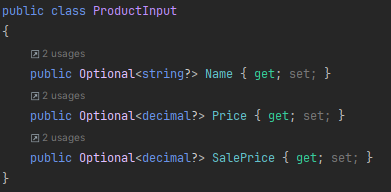
Then, in your mutations, only update properties if a value was provided:
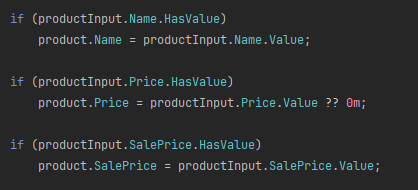
Now, you can call your Update mutation and only provide the ProductId and a value for SalesPrice, and ignore everything else!
Handling Add & Update Inputs with Optional<>
Using Optional<> can cause problems with Add & Update mutations, such as ProductName would be required by Add, but optional with Update.
The way to get around this is to have two input types:
public class AddProductInput
{
    [GraphQLNonNullType]
    public string Name { get; set; } = null!;
}
public class UpdateProductInput
{
public Optional<string?> Name { get; set; }
}
Leave a Reply